Your source for fun, free games-web tools-freeware
Webpage Printing Tips Customize the Date, Time and URL in Internet Explorer
Webpage Printing Tips simple instructions showing how to customize printing of the date, time, web address URL in the header and footer and how to print in internet explorer with no header or footer.
You can print in internet explorer with no margins, the time, date, web address URL or page numbers. You enter codes to customize the headers and footers to print your
pages as you wish them to be printed. There are simple instructions complete with pictures and a chart of special codes for the page setup.
In Internet Explorer go to File, then Page Setup, find the section labeled Headers and Footers.
So you can return it to its original state copy down on a piece of paper the characters listed under the Header and Footer fields.
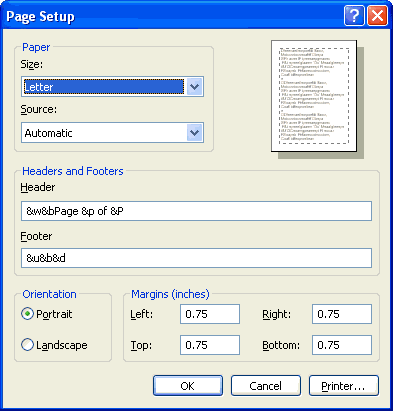
Then delete all of the characters in the Header and Footer fields. See the first image as an example of what you may find entered there.
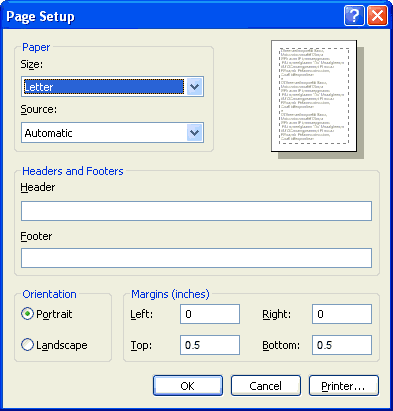
Next you want to set the margins to zero 0 so that the whole page can be printed from top to bottom and from the left edge to the right edge.
that should do it, see the second image as an example of how it should look when you are finished. If you don't set the margins to zero 0 and you try
to print the whole page you will end up with a white border all around the page and the images cut off.
An example of what you may find in your page setup properties tab.
How it should look when you are finished.
If you decide you want to change what is printed in the header and footer you can enter these codes to print what you want printed. Now you can type them in according to what you wish to show.
You can also enter plain text into the fields, like "Page &p of &P," to show the number of that page out of the total number of pages.
If you only want to show which page it is out of the total number of pages you would enter this in the header and/or footer field:
Here are the codes:
&d = Date (short) like this:
02/11/26
&D = Date (long) like this:
Wednesday, February 11 2026
&u = Page Address like this: https://www.thepcmanwebsite.com/webpage_printing_tips.shtml
&t = Time 12 hour (1-12) like this:
1:03:46 PM
&T = Time 24 hour (0-23) like this:
13:03:46 PM
&p = Number of the Page
&P = Total Number of Pages
&w = Window Title
&& = A Single Ampersand (&)
&b = what comes after this code is centered, for example "&b&d" if I wanted the date.)
&b&b = By using 2 of these codes what comes after the first "&b" gets centered, and what comes after the second "&b" goes to the right. For example "&b&d&b&w" if I wanted the date centered and the window title to the right.
Using these simple instructions and codes in your webpage printing can help you to customize how your webpages look when printed.